Proposal engagement, live

Turn any proposal into a live buying signal.

Know exactly when it is time to call and who else is involved in the decision.

Know the second a prospect opens your proposal

Real product, real time — the alert arrives the moment your prospect opens the PDF.

Jeff Cope, founder of PipelinePulse

I built this because I was the guy sending proposals into the void.

I ran sales at InspectionXpert — a manufacturing quality-software company you have almost certainly never heard of. We sent about 60+ quotes a month. I could tell you our win rate to the decimal. I could not tell you which of those quotes anyone had actually opened, or when, or who else in the building had seen them. Every rep I have ever managed has worked that way. It is insane, and it is completely normal.

— Jeff Cope, Founder

Two ways to send a proposal.

The old way

The PDF Black Hole

1. Send PDF attachment

Into the abyss of a crowded inbox.

2. Wait 3 days in silence

No idea if it was even opened.

3. Get ghosted

The deal quietly dies.

The PipelinePulse way

The Live Intercept

1. Send secure link

PIN-gated, fully trackable.

2. Instant Pulse Red SMS alert

Fires the second they open it.

3. Follow up while you are top of mind.

Close the deal at peak intent.

The pulse

Two colors. One signal that matters.

Your dashboard stays calm and monochrome — until it does not. The pulse is the only color on the screen, so a rep never misses the moment that closes a deal.

Blue — Viewed. A prospect opened your proposal.
Red — Live. Someone is reading it right now. Call them.
The five-minute window

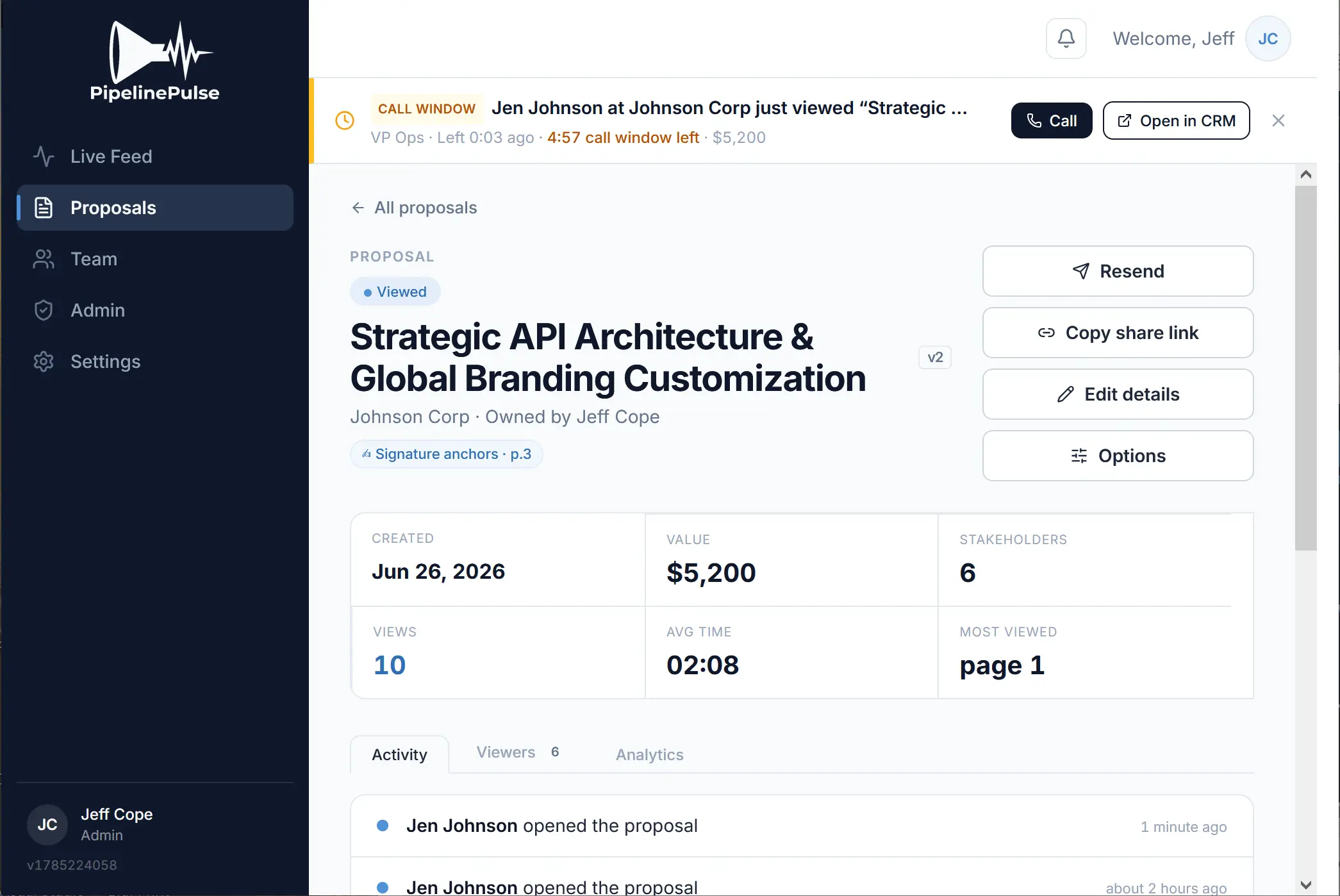
The banner flips from Viewing to Viewed — and the clock starts.

MIT research on lead response found that reaching a prospect within five minutes rather than thirty makes you dramatically more likely to connect and qualify them. The timer tells your rep exactly how long that window lasts — call while it is live and you catch them with the proposal still fresh, not a day later.

A PipelinePulse call-window banner: Jen Johnson at Johnson Corp just viewed the proposal, 4 minutes 57 seconds of call window left, with Call and Open in CRM buttons
The Deal Room

See the whole buying committee — not just your champion.

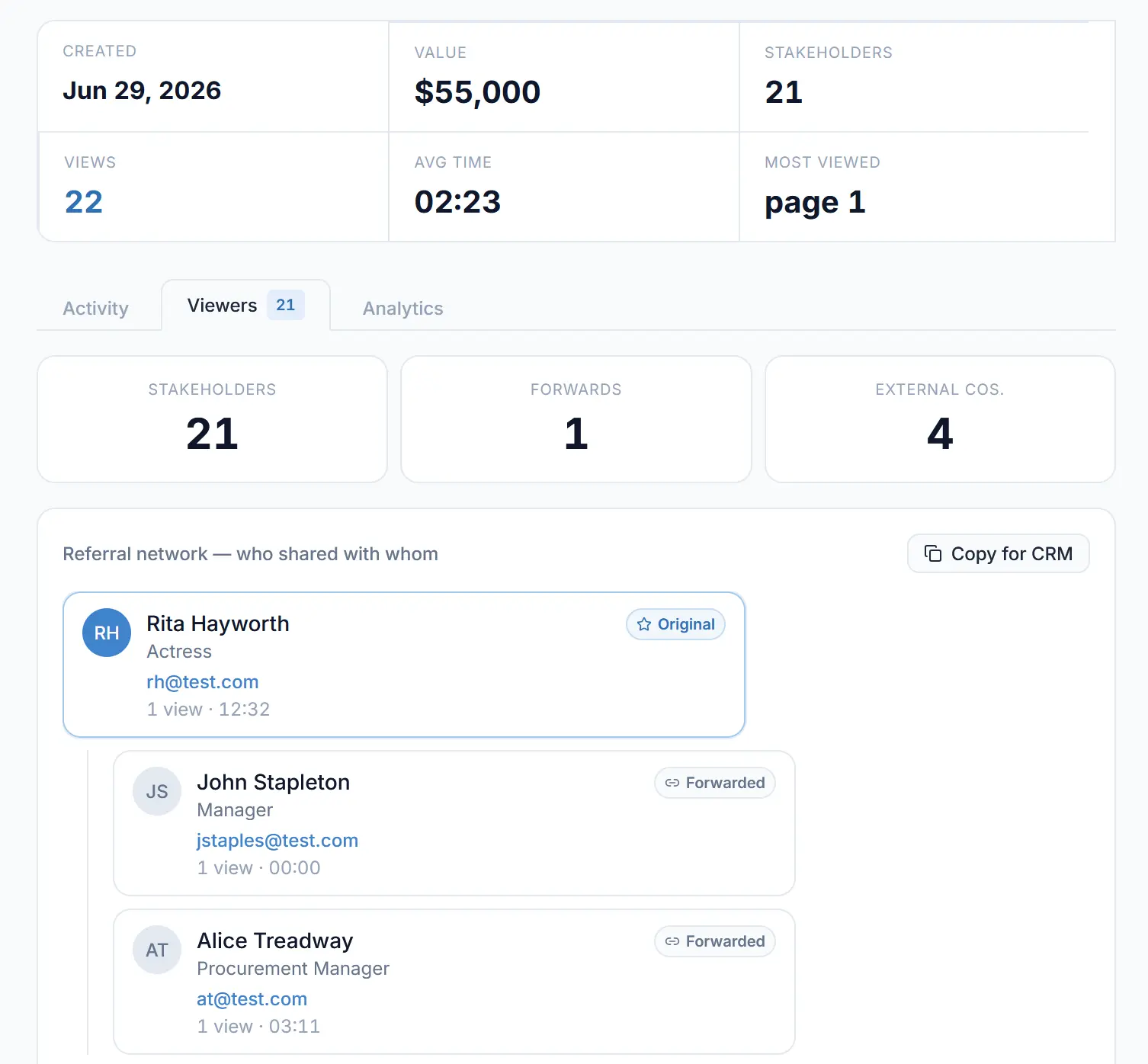
When your proposal gets forwarded, PipelinePulse maps who shared it with whom. Watch the Director of Finance and Procurement enter the deal — the moment they do.

Referral network — who shared with whom
The PipelinePulse Viewers tab: 21 stakeholders, 1 forward, 4 external companies, and a referral tree showing who shared the proposal with whom

Every share is mapped automatically — who it went to, their role, and how they have engaged — so you see the whole committee, not just your one champion.

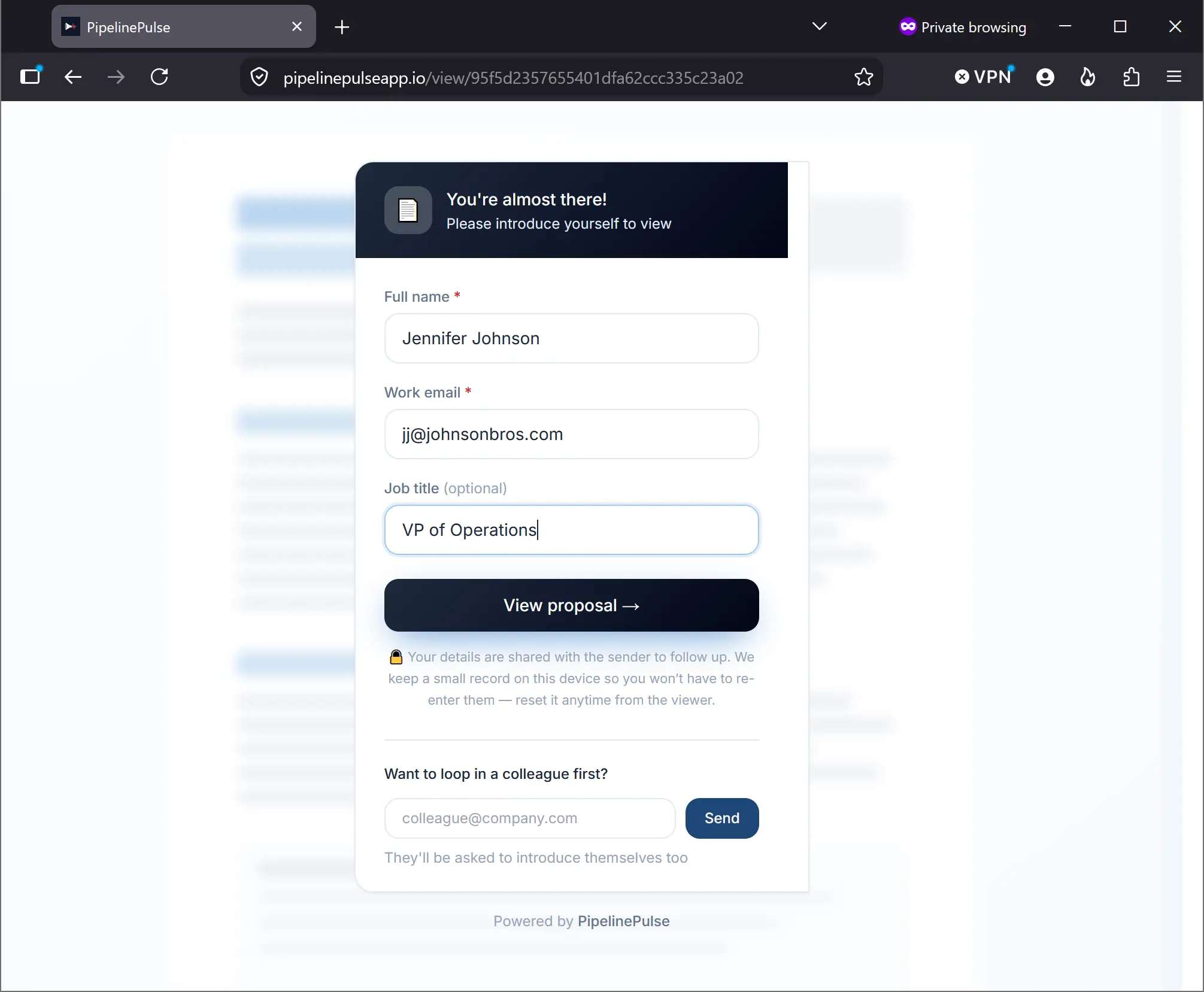
The stakeholder gate — how we know who is who
The PipelinePulse stakeholder gate where a viewer enters their name, work email and job title before opening the proposal

Anyone opening the proposal introduces themselves first — and can invite a colleague, so every forward is captured instead of disappearing into a reply-all.

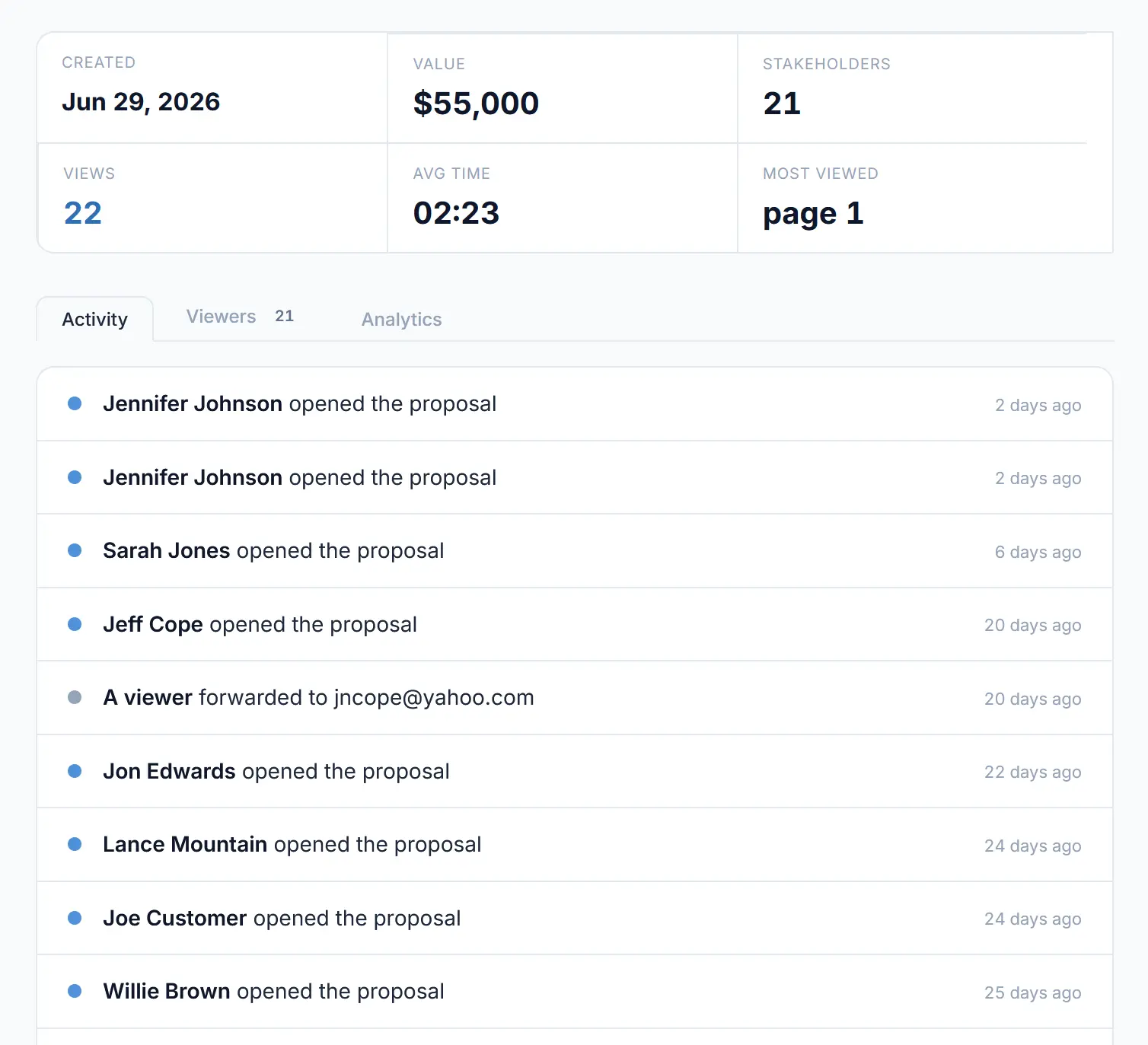
The PipelinePulse activity feed listing every person who opened the proposal and every forward, with timestamps
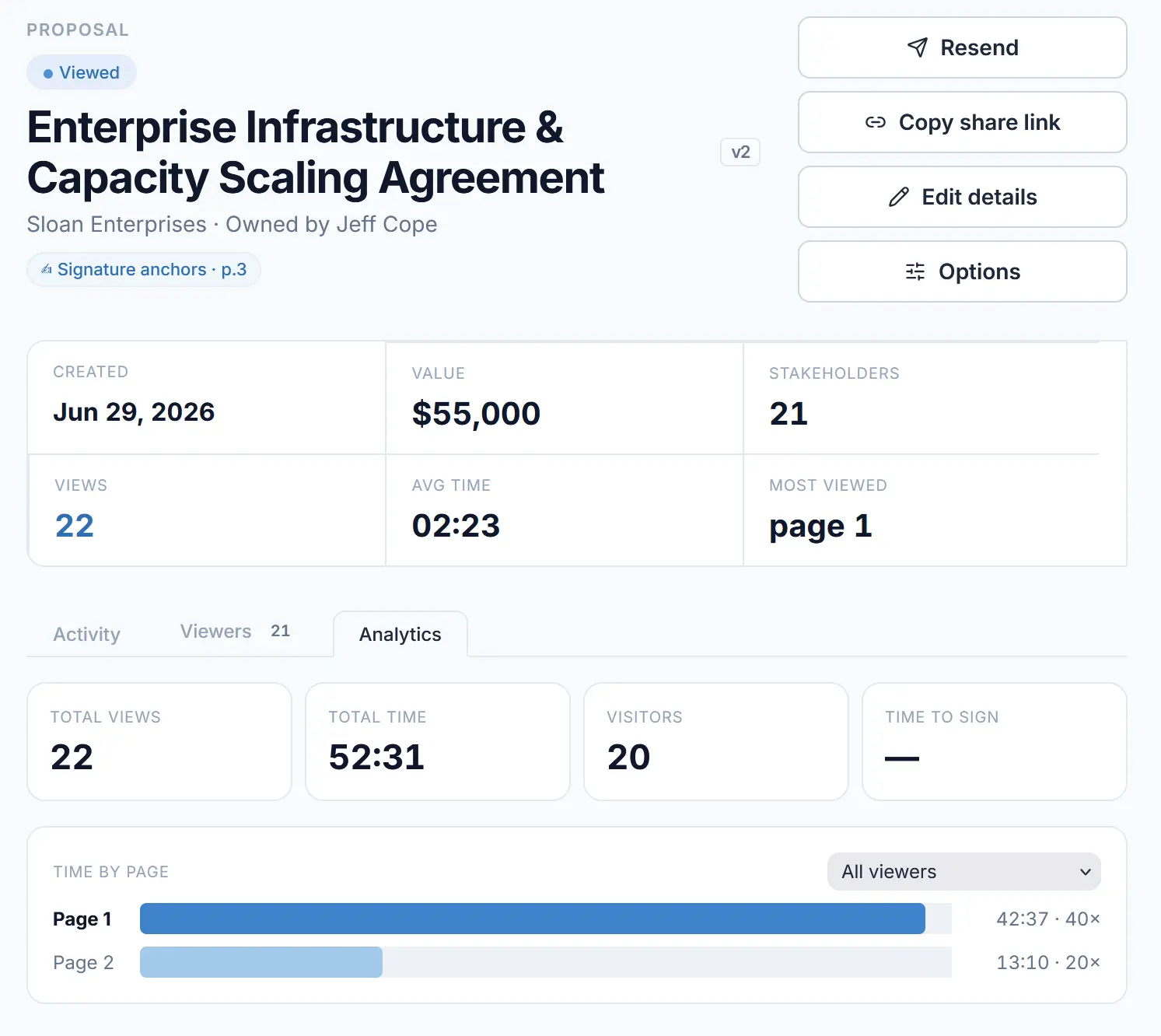
PipelinePulse analytics for a proposal: 22 total views, 52 minutes 31 seconds total time, 20 visitors, and time spent on each page with a filter for all viewers or one viewer
Engagement, page by page

See where they slowed down — for the whole deal, or one viewer.

Every open and every forward lands in the activity feed as it happens, then rolls up into page-level analytics: total time, total visits, and which page held their attention. Filter down to any single stakeholder to see exactly how they read it — useful when the Procurement Manager and the VP read the proposal very differently.

Author anywhere

Keep your proposals. Change nothing about how you make them.

Most tools make you rebuild every proposal in their editor. PipelinePulse does not. Write in whatever you already use, export a PDF, and upload it — it is instantly trackable, with your branding untouched. When your prospect is ready, they sign it electronically, right there.

  • Upload any PDF — no new authoring tool to learn
  • Your layout, fonts, and branding stay exactly as you made them
  • Built-in electronic signature for your prospect
  • Real-time buyer-intent signal the moment they open it
WordGoogle DocsInDesignCanvaPowerPointYour CRM
→   export any PDF   →
Uploaded, tracking & e-sign ready
Their view, untouched
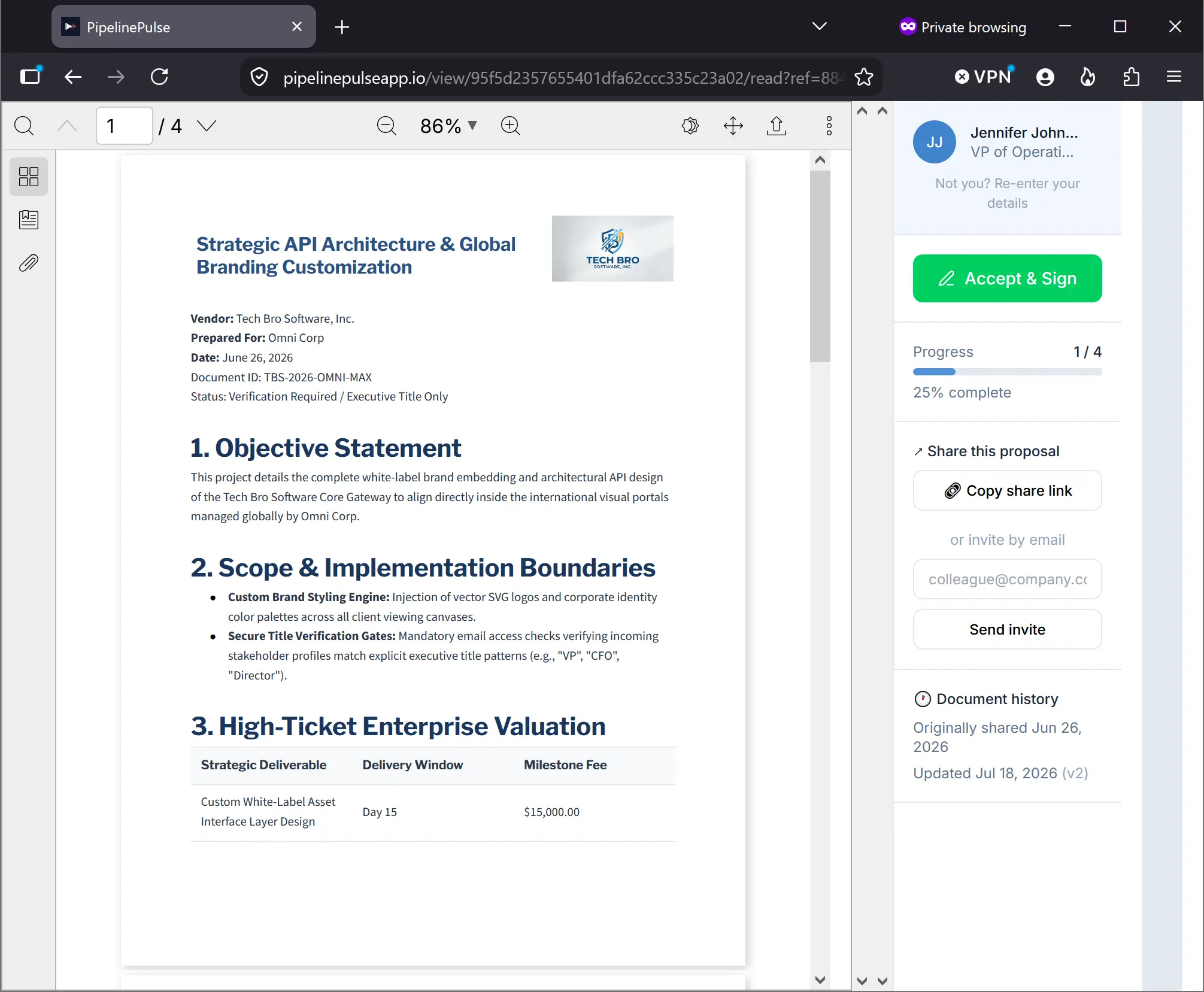
A proposal PDF open in the PipelinePulse viewer with an Accept and Sign button and reading progress in the side rail
Your PDF, exactly as you made it

No re-authoring. No watermarks. Just your document.

Whatever you upload is exactly what they see — wrapped with reading progress, easy sharing, and Accept & Sign in the side rail, so the whole exchange happens without either of you leaving the page.

How we are different

Signal and signature, without the lock-in.

Authoring tools trap your content in their editor. E-signature apps tell you it got signed, but nothing before. PipelinePulse gives you both — on any PDF.

What you getAuthoring toolsE-signature appsPipelinePulse
Use any authoring app — no lock-in
Upload any PDF, zero reformatting
Electronic signature
Real-time open & read alerts
Live viewing-now buyer signal
Team Live Feed of buyer intent
Deal Room — map the buying committee
How it works

Live in minutes, not a migration.

1

Upload your proposal

Drop in any PDF. We wrap it in a trackable link — your branding, no watermarks.

2

Send it like always

Share the link by email or your CRM. Nothing changes for your prospect.

3

Feel the pulse

Watch the Live Feed light up the second they engage — and follow up while you are top of mind.

4

Capture the stakeholders

Our stakeholder gate captures every person the proposal reaches.

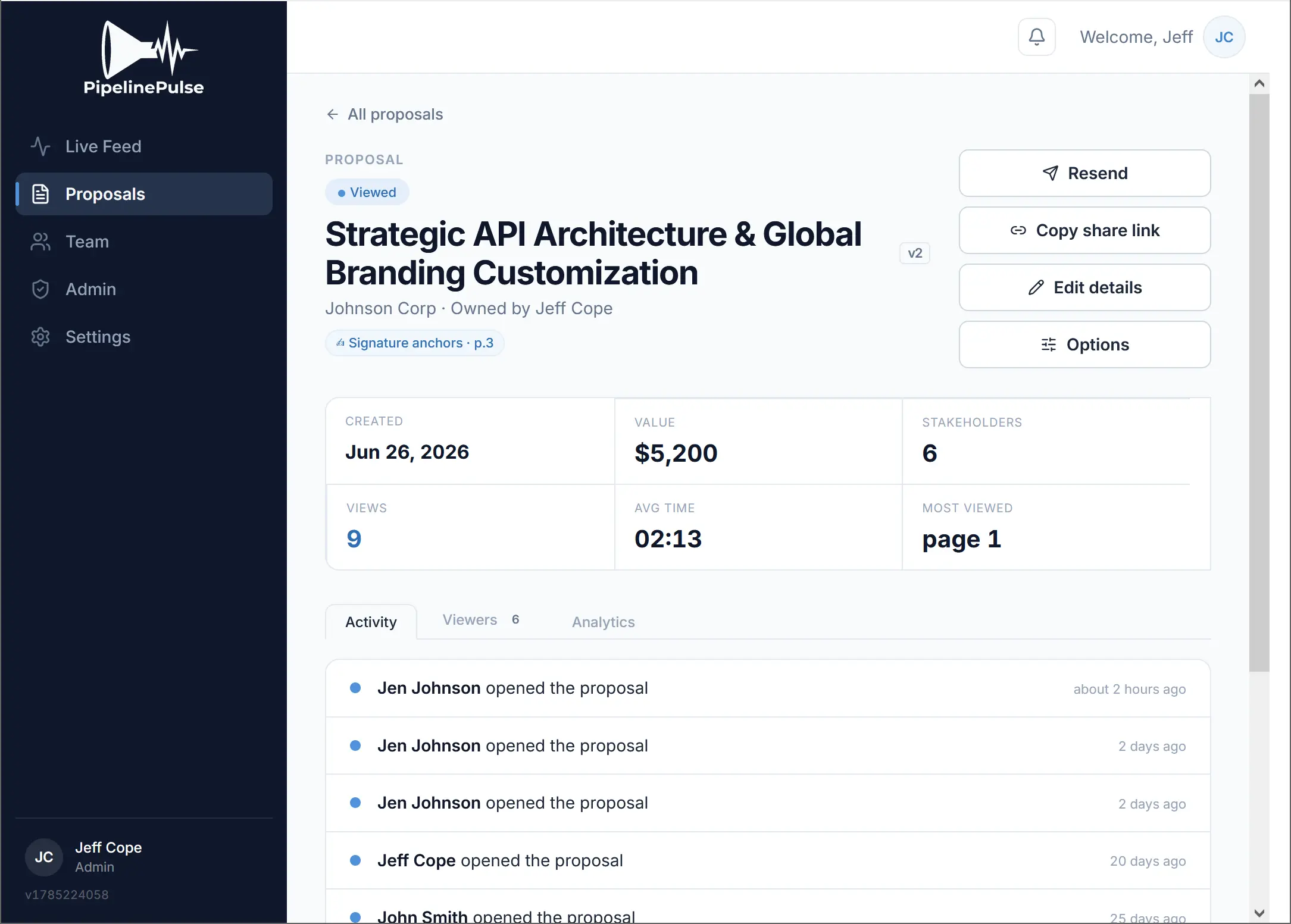
The PipelinePulse proposal page showing viewed status, deal value, stakeholder count, views, average time, most-viewed page and the activity feed
Then it all lives in one place

One proposal, one screen.

After you send it, the proposal page is where the deal lives: whether it has been viewed, what it is worth, how many stakeholders have touched it, the average time spent and the page they keep coming back to — with resend, share link and e-sign controls one click away.

We are still earning our customer quotes.

PipelinePulse is in private beta with a small group of sales teams. Instead of showing you testimonials we have not earned yet, we will run one of your recent proposals through the product and show you exactly how it works.

Book a 15-minute walkthrough
Pricing

Flat rate. Never per rep.

One price, unlimited seats — priced by what you send, not who you hire.

What you would pay

Drag your team size. Our price does not move — that is the whole point.

Reps on your team12 reps
You pay
PipelinePulse · Professional
$199/month, total
Stays flat Unlimited users — the number above never changes as you hire.
For comparison — a typical per-seat tool at $41/user
$492/month · climbs with every hire
At 12 reps you keep $293/mo — and the gap widens with every person you add.
Choose your plan

Start free. Scale on flat pricing — never per seat.

Basic

Free

See PipelinePulse work on your own proposals.

  • 1 user · up to 3 proposals / month · PDFs up to 5MB
  • The full engagement experience — open alerts, stakeholder tree, page-view analytics
  • You'll see that someone is viewing — names are hidden
Upgrade to Professional to reveal who — including everyone who already viewed your proposals.
Get started free

Professional

$199/mo

For growing sales teams that live on fast follow-up.

  • Unlimited users
  • Up to 100 proposals / month
  • PDFs up to 15MB
  • Instant open alerts, stakeholder maps, e-signature, view analytics
Start free trial
MOST POPULAR

Premium

$499/mo

For high-volume teams that need to plug into their stack.

  • Everything in Professional
  • Up to 200 proposals / month
  • PDFs up to 25MB
  • REST API + webhooks
  • Advanced engagement analytics
Start free trial

Enterprise

From $1,299/mo

For larger orgs with security, scale, and forecasting needs.

  • Everything in Premium
  • 600+ proposals / month
  • SSO / SAML, SCIM, role-based access, audit logs
  • White-label, SLA & dedicated support
  • Predictive deal scoring on real proposal-engagement signals
Book a demo
Compare plansBasicProfessionalPremiumEnterprise
Monthly priceFree$199$499From $1,299
Users1UnlimitedUnlimitedUnlimited
Proposals / month3100200600+
Max PDF size5MB15MB25MB50MB
Instant open alerts
Stakeholder tree + page analytics
See who is viewing (stakeholder identities)Hidden✓ Revealed✓ Revealed✓ Revealed
Electronic signature
MFA / 2FA + activity log
REST API + webhooks
Advanced analytics
SSO / SAML · SCIM · RBAC
White-label · SLA · dedicated support
Predictive deal scoring

What happens if I go over my proposal limit?

Nothing that gets in your team's way. We never block a rep from sending a proposal — a proposal closing a deal always goes out. If you pass your monthly allowance, here is exactly how it works:

First 5 are free

Go a little over? Your first 5 proposals past the limit each month are on us — no charge, no interruption.

Then blocks of 25

Beyond that, proposals are added in blocks of 25 for $99, added automatically so you are never stopped mid-send.

One line, once a month

Any blocks used appear as a single line on your next invoice — no per-proposal charges, no surprises.

We tell you before it happens. You will get a heads-up at 80% and 100% of your monthly allowance. Allowances reset each billing cycle and blocks do not roll over. And if you are consistently going over, upgrading is almost always cheaper than buying blocks — we will point it out when that is true for you.

FAQ

Questions worth answering up front.

Can the recipient tell the proposal is being tracked?

Yes, and we think that is the right answer. Recipients open a branded PipelinePulse viewer, not a disguised PDF. We track engagement with the document you sent them — opens, pages, time, forwards. We do not log IP addresses for analytics, we do not fingerprint devices, and we do not follow anyone anywhere else on the internet.

Do you record IP addresses?

Not for analytics or engagement tracking. The one place an IP address is recorded is the electronic signature audit trail, at the moment of signing, because a timestamped record of who signed and from where is what makes an e-signature hold up if it is ever challenged. By default we mask it, storing only the general portion with the final segment removed, and you control whether it is captured at all.

Do I have to change how I send quotes?

No. You send the same PDF you send today; you paste a link instead of attaching a file. Your document, your template, your process.

Does it work with my CRM?

The link works anywhere you can paste a URL, so it works with every CRM on day one. Premium adds a REST API and webhooks for pushing engagement events into your CRM of choice.

What if my prospect forwards it to someone?

That is the good part. You will see the new viewer appear in your stakeholder map — a name or email if they authenticate through a gate, anonymous if not — along with what they read and how long they spent.

Where does my data live, and can I get it out?

You can export everything and delete everything, at any time, from your own dashboard. Full detail is in our DPA and privacy policy.

What happens to my proposals if I cancel?

Export your data before you go and your existing links stay live for 30 days so no buyer hits a dead URL mid-deal. We do not hold your documents hostage.

Your next deal is being read right now.

Start free in under five minutes. Feel your first pulse today.

Start Trial — no card
Start free today14-day trial · no credit card
Start Trial